PHP is both a procedural language and an object-oriented language. Just about all the code samples from the book for this course use procedural PHP. And the first few steps of our my-new-site project follow this approach as well. But we can also create classes in PHP, and that really helps us to organize our code.
I have a confession to make, it was a big struggle for me to keep adding functions to our config file in the 'my-new-site' project! This is a procedural approach (a bunch of functions, rather than objects that contain methods). I much prefer to organize my code into classes. In fact, my website has only one php file that is not a class (index.php).
Many beginning books on PHP ignore classes, and instead teach the procedural approach. I believe that this is done because the authors don't assume that you know anything about object-oriented programming. But you have all been through Java, and C#, so you should already have a solid understanding of classes and objects.
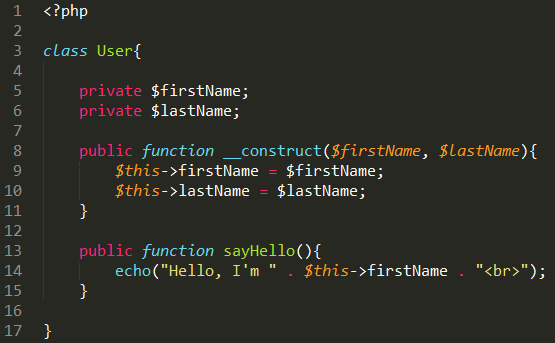
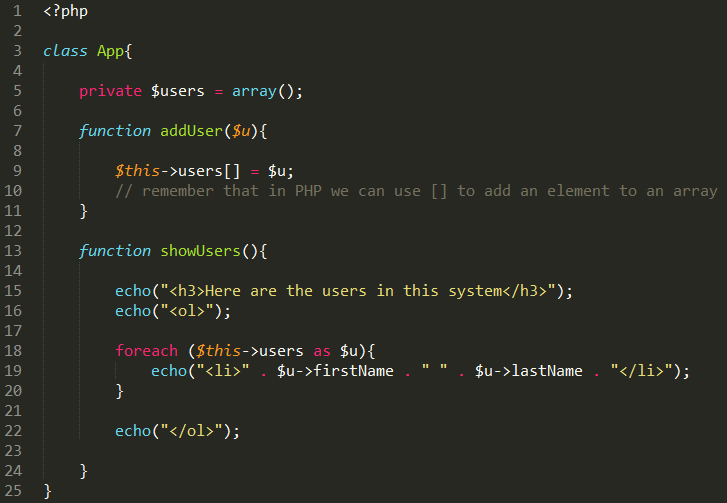
Add this code to the page. But before you start typing in the code, read the next few notes.
Be careful with the dollar signs! If you are still relatively new to PHP, you probably forget them a lot. But be extra careful with this example, the dollar signs may seem to be in extra strange places (more on that in a minute).
Classes are usually defined in their own include file (hence the file name User.inc.php) They are not pages that are meant to be displayed in the browser, rather they are components to be used in PHP web pages.
Note that PHP does not use the dot operator, instead it uses what some people call the skinny arrow, which is a dash followed by the greater than sign. This may look very strange to you unless you have done some C programming.
Note that to define a constructor function you use __construct(). In older versions of PHP you could write a constructor function like the one below, but it is now deprecated (I'm not sure why they did that):
// this approach to create a constructor doesn't work in PHP 7...

function User($firstName, $lastName){
	$this->firstName = $firstName;
	$this->lastName = $lastName;
}


// This is how you must define constructor functions in PHP 7...

function __construct($firstName, $lastName){
	$this->firstName = $firstName;
	$this->lastName = $lastName;
}
By the way, when a function name starts with two underscores in PHP, it's known as a 'magic' function. For more information on that, check out this link.
Note that when you use 'this' to access an instance variable, you put the dollar sign before 'this'. Kinda strange!
Finally, include files don't need the closing php delimiter: ?>. Notice that it's not in the screen shot of the User.inc.php file. If you did put ?> at the bottom of the page, and then had some return carriages (or spaces) after that line, then the return carriages would get sent as output to the browser. This could potentially cause some problems. For more info, check out this link.
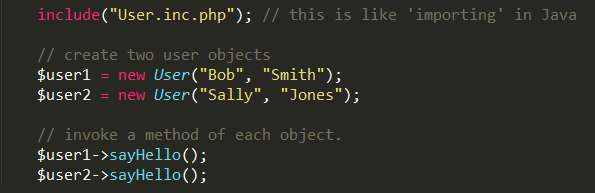
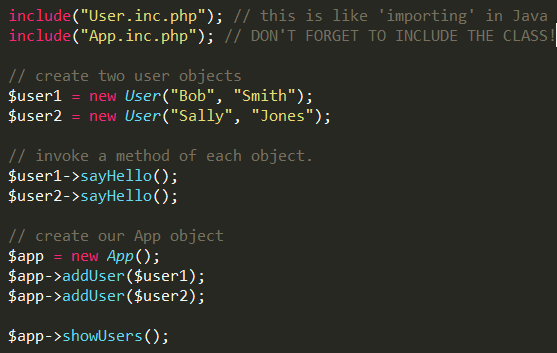
At the top of this file (index.php) you'll see a block of PHP code. It simply echos 'Put your PHP client code here!'. Replace the echo statement with this code.
Reload this page in the browser. If you get any errors, make sure you didn't forget to use a dollar sign somewhere in User.inc.php
Note that the code in this page is client code. It is the code that makes use of our User class.